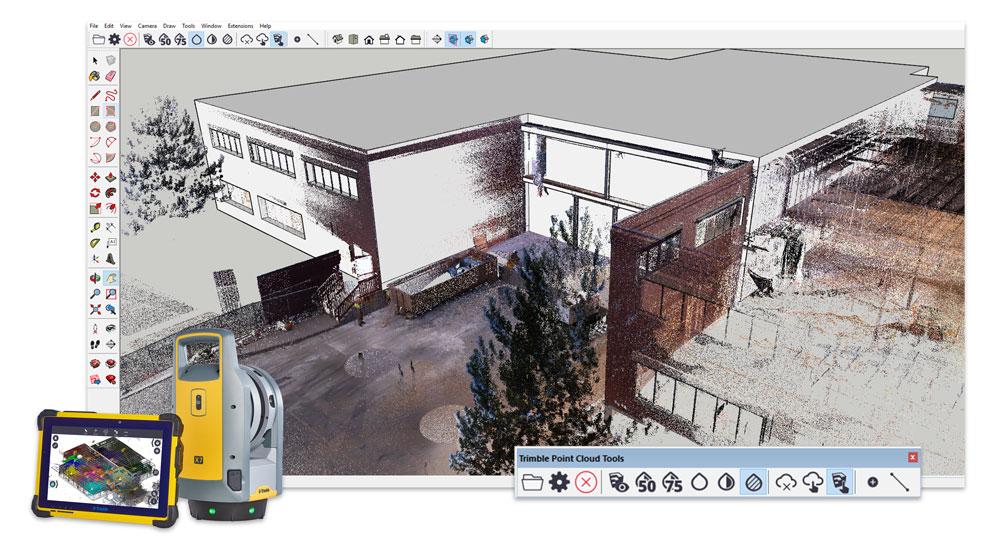
Are you looking for a quick, easy way to turn point clouds into 3D models? Well, it’s your lucky day! We’re proud to announce a SketchUp integration with the new Scan Essentials extension from Trimble.
With Scan Essentials, you can import, view, and model from 3D scan data directly in SketchUp — in a matter of minutes. Keeping interoperability top of mind, you are able to import a variety of industry-standard file types such as E57, LAZ, and LAS as well as the Trimble RWP format from terrestrial laser scanners, mobile mapping devices, and drones.
Once you’ve imported your file type, you can start your 3D modeling workflow in SketchUp. Large data sets are optimized using Trimble’s scanning engine to ensure smooth modeling. From there you can lock on to points and dramatically increase the accuracy of your model. Sweet.
Lastly, add on your final touches to really make it shine. Inspect and compare the accuracy of your model to the point cloud data using a nifty comparison feature. Accuracy has never been easier!
If you are a general contractor, urban designer, or architect, you’ll love the ease and accuracy of Scan Essentials. Check out the perks you’ll get to take advantage of in your workflow with Scan Essentials:
Importing and viewing point clouds from terrestrial scans, mobile mapping, and drones within SketchUp
Modeling directly on the point cloud
Ability to lock onto points
Comparison capabilities using your 3D model & point cloud
Ability to change point cloud transparency, change the selection priority, and create section views
More of a visual learner? Check out this demo.
To get started using this in your workflow, download the extension straight from Extension Warehouse today. If you aren’t a current SketchUp subscriber, try it out using our free trial. Happy modeling!


