Two watercolor-styled renderings by James Akers, showing the initial drawing and the final overlay (created using SketchUp for iPad and Procreate).
While the building industry has moved from 2D drawings to 3D models and virtual reality, some designers miss the tactile feel of designing and rendering their concepts by hand. It’s not surprising, given your hands and your brain are two parts of your body that are firmly connected, and working with your hands is good for your brain. SketchUp for iPad’s release in early 2022 means that architects can once again create with their fingertips – amplified by the power of 3D modeling.
James Akers, a longtime architectural design and visualization consultant, is passionate about designing and rendering by hand (with a bit of help from Apple Pencil) on SketchUp for iPad, and – even better – he’s already perfected the workflow to do it. He creates hand-drawn renderings for large-scale hospitality and residential projects using SketchUp for Desktop and, more recently, SketchUp for iPad combined with either Procreate or Morpholio Trace. James affectionately refers to SketchUp for iPad as “SkiP” for shorthand and because it's light and friendly. He’s recently started using it for early-stage concept design, schematic design development, and hand-drawn renderings.
“The first thing I noticed about SketchUp for iPad was its high-quality resolution. It’s similar to the difference between an old 4-bit video game and the newest games. I saw the difference the first time I zoomed in on a sample of wood texture while doing an in-app tutorial, and it blew me away.”

Black and white watercolor-styled rendering by James Akers (created using SketchUp for iPad and Procreate).
James’ clients are primarily based in New York City and often prefer watercolor renderings for presenting their early concepts. These renderings are more fluid – perfect for explaining your vision without committing to a photo-realistic likeness that may change later. Design principals often come to him on a tight deadline to submit a proposal for a project and need a quick presentation for their initial design concepts. In recent years, James’ comparatively expensive watercolor business model had trouble competing with both in-house and inexpensive offshore computer renderings, and he began to lose business.
“My clients had begun to see me as the expensive dinosaur. My dilemma was, how do I create renderings of the same quality but more promptly and cheaply? Many design firms hire tech-savvy employees who can produce outstanding photo-realistic computer renderings, but a lot of time is wasted going back and forth between them and the design principal. Because of my 20 years of experience, I can render an early-stage concept more quickly and inexpensively than if they have to put a team together."
SketchUp for iPad was a game-changer for James’ consulting business. Now he can step in, build a quick massing study on iPad, export 2D scenes for hand rendering in either Morpholio Trace or Procreate, and voila! His hand-drawn sketches are eye-catching and help his clients' designs stand out from the crowd of computer-generated renderings.
“Depending on whether I’m at my desk, I’ll sometimes build the first massing model in SketchUp for Desktop and then import it into SketchUp for iPad to see it in beautiful, high-quality resolution. I find it easier to customize the styles settings of my 2D scenes in SketchUp for iPad than in SketchUp for Desktop; fewer choices and the higher resolution of the linework make them more appealing! After making edits, I’ll export 2D scenes back to Procreate and begin to layer colors, textures, and shadows over the model. ”

Watercolor-styled rendering by James Akers (created using SketchUp for iPad and Procreate).
James recommends using the right app, at the right time, for the right job. Procreate is excellent for the watercolor aesthetic he often uses, while his Morpholio Trace renderings have a silkscreen look akin to vintage travel posters.
Whether using SketchUp, Morpholio Trace or Procreate, James knows that his drawings need to be as much in scale as possible. If the work demands sensitivity to real-world dimensions, he ensures these dimensions appear on the 2D floor plans he exports to SketchUp. To-scale renderings will become even more critical as James extends his workflow to augmented reality and places his clients’ projects in the real world using AR mode on his iPad.
Want to learn all the pro tips for this workflow? Watch James’ video.
Worried about adjusting to a new device? SketchUp for iPad’s intuitive UI, device-specific functionality, and in-app tutorials will ramp you up in no time. For good measure, here’s a tutorial by James on how to get started.
SketchUp for iPad is included in any SketchUp subscription. If you’re not already a subscriber, you can try James’ workflow out with our free seven-day trial on the Apple App Store.
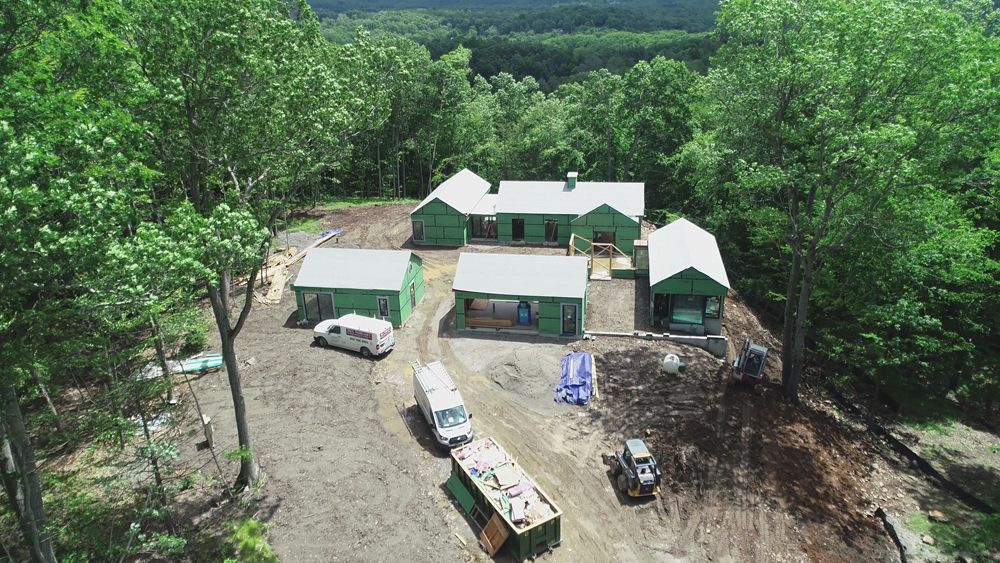
Aerial construction photo of a house James Akers designed using SketchUp for iPad and Procreate.