Overview
Features and highlights
Compare massing concepts, spatial layouts, and envelope options to define the right solutions.
Track and evaluate your sustainability goals against current standards.
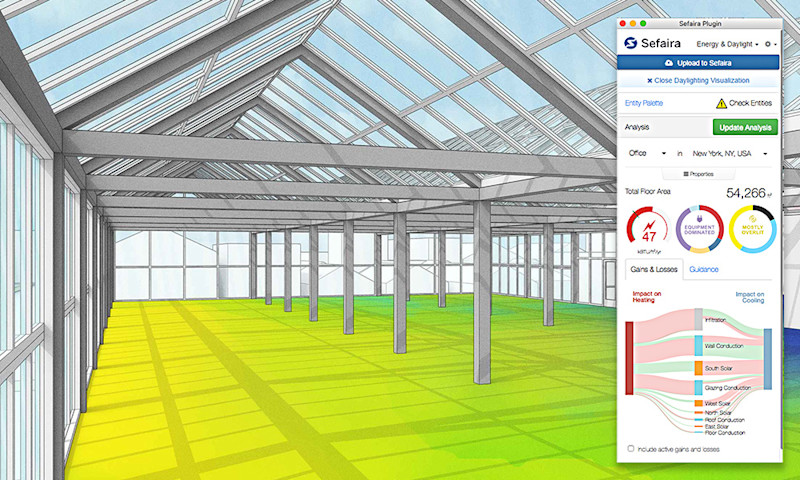
Perform energy and daylight analysis directly within the modeling environment using the Sefaira plugin.
Run robust, comparative analysis with the web app to analyze different HVAC system options, utilize natural ventilation strategies, and perform thermal comfort calculations.
Technical specifications
An internet connection is required both to install and authorize your subscription. Sefaira features also require an internet connection to run and are only available in English.
Sefaira uses geometry from one of two 3D authoring platforms, SketchUp or Revit. You must have at least one of these to study your own geometry in Sefaira. The following versions are officially supported:
SketchUp 2026, 2025 and 2024
Revit 2025, 2024 and 2023
Sefaira
Recommended System Requirements
Sefaira for SketchUp plugin: Windows and Mac OS compatibility.
Sefaira for Revit plugin: Windows 64-bit compatibility only. You must have Internet Explorer 10+ installed on your machine.
Sefaira Web-application: Google Chrome, Safari, Firefox and Internet Explorer 11 compatibility.
Pricing and plans
Available as an annual subscription.
Annual: $166.25 per user per month, billed annually | $1,995 per year
Contact Sales for Enterprise and EDU plans
Pricing Excludes tax and VAT.
Payment options may vary based on your location or region.
What's included
Software access: Access to Sefaira Web App, Sefaira for SketchUp and Sefaira for Revit.
Support: 24/5 technical support via email and the Trimble Support Portal
Updates: ongoing security patches and feature updates at no extra cost
Resources: unlimited access to the online knowledge base, and community forums
How it works
1. Purchase: Select your preferred plan and complete the streamlined checkout.
2. Activation: Once your order is confirmed, log in to the Trimble Admin Console using your Trimble ID.
3. Assign Licenses: Use the console to assign licenses to yourself or your team members.
4. Download and launch: Follow the setup link in your confirmation email to download the software or access the web-based application.
5. Design & Collaborate: Start creating projects in 2D or 3D and invite collaborators immediately.
Overview
Features and highlights
Compare massing concepts, spatial layouts, and envelope options to define the right solutions.
Track and evaluate your sustainability goals against current standards.
Perform energy and daylight analysis directly within the modeling environment using the Sefaira plugin.
Run robust, comparative analysis with the web app to analyze different HVAC system options, utilize natural ventilation strategies, and perform thermal comfort calculations.
Technical specifications
An internet connection is required both to install and authorize your subscription. Sefaira features also require an internet connection to run and are only available in English.
Sefaira uses geometry from one of two 3D authoring platforms, SketchUp or Revit. You must have at least one of these to study your own geometry in Sefaira. The following versions are officially supported:
SketchUp 2026, 2025 and 2024
Revit 2025, 2024 and 2023
Sefaira
Recommended System Requirements
Sefaira for SketchUp plugin: Windows and Mac OS compatibility.
Sefaira for Revit plugin: Windows 64-bit compatibility only. You must have Internet Explorer 10+ installed on your machine.
Sefaira Web-application: Google Chrome, Safari, Firefox and Internet Explorer 11 compatibility.
Pricing and plans
Available as an annual subscription.
Annual: $166.25 per user per month, billed annually | $1,995 per year
Contact Sales for Enterprise and EDU plans
Pricing Excludes tax and VAT.
Payment options may vary based on your location or region.
What's included
Software access: Access to Sefaira Web App, Sefaira for SketchUp and Sefaira for Revit.
Support: 24/5 technical support via email and the Trimble Support Portal
Updates: ongoing security patches and feature updates at no extra cost
Resources: unlimited access to the online knowledge base, and community forums
How it works
1. Purchase: Select your preferred plan and complete the streamlined checkout.
2. Activation: Once your order is confirmed, log in to the Trimble Admin Console using your Trimble ID.
3. Assign Licenses: Use the console to assign licenses to yourself or your team members.
4. Download and launch: Follow the setup link in your confirmation email to download the software or access the web-based application.
5. Design & Collaborate: Start creating projects in 2D or 3D and invite collaborators immediately.
Please get in touch with your account owner for assistance. If you wish to make a purchase, we recommend signing out and creating a personal account.