Skip to content

Turn point clouds into 3D models with Scan Essentials

2 minutes read
| |
April 27, 2020

Share this post:

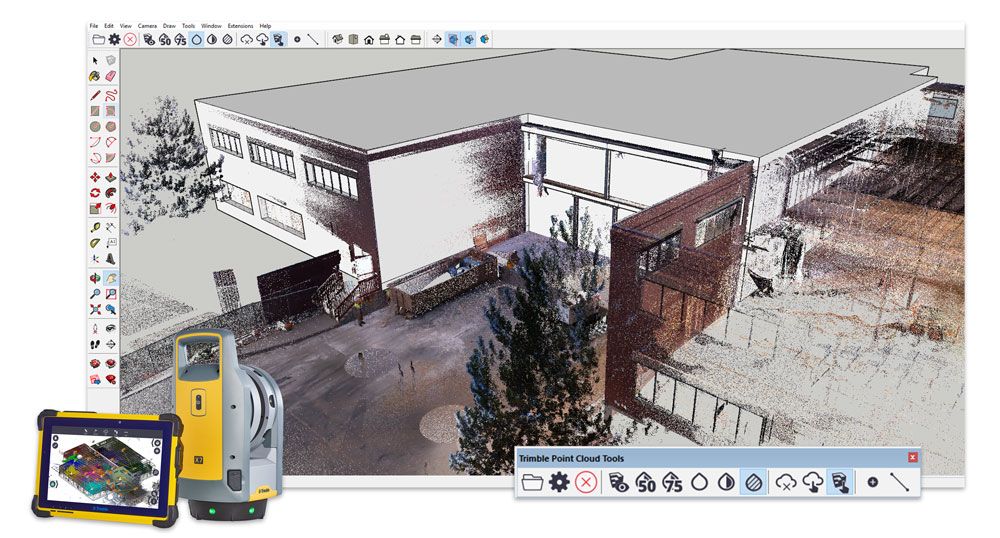
A point coud in SketchUp

Are you looking for a quick, easy way to turn point clouds into 3D models? Well, it’s your lucky day! We’re proud to announce a SketchUp integration with the new Scan Essentials extension from Trimble.

With Scan Essentials, you can import, view, and model from 3D scan data directly in SketchUp — in a matter of minutes. Keeping interoperability top of mind, you are able to import a variety of industry-standard file types such as E57, LAZ, and LAS as well as the Trimble RWP format from terrestrial laser scanners, mobile mapping devices, and drones.

Once you’ve imported your file type, you can start your 3D modeling workflow in SketchUp. Large data sets are optimized using Trimble’s scanning engine to ensure smooth modeling. From there you can lock on to points and dramatically increase the accuracy of your model. Sweet. 

Lastly, add on your final touches to really make it shine. Inspect and compare the accuracy of your model to the point cloud data using a nifty comparison feature. Accuracy has never been easier!

If you are a general contractor, urban designer, or architect, you’ll love the ease and accuracy of Scan Essentials. Check out the perks you’ll get to take advantage of in your workflow with Scan Essentials:

  • Importing and viewing point clouds from terrestrial scans, mobile mapping, and drones within SketchUp

  • Modeling directly on the point cloud

  • Ability to lock onto points

  • Comparison capabilities using your 3D model & point cloud

  • Ability to change point cloud transparency, change the selection priority, and create section views

More of a visual learner? Check out this demo.

To get started using this in your workflow, download the extension straight from Extension Warehouse today. If you aren’t a current SketchUp subscriber, try it out using our free trial. Happy modeling!

Related articles

Article

Visualize and build automated warehouse systems with SketchUp

Senior Applications Engineer at TGW, an international provider of warehouse automation solutions, sh...
Read full article
Article

Orchestrating a global design sprint for the JAL Lounge at Liverpool's Anfield football stadium

Long-distance collaboration and a short deadline complicated completion of a new hospitality lounge ...
Read full article
Article

SketchUp 2025 delivers next-gen visualization, interoperability and content

Explore the latest updates with SketchUp 2025. Unlock powerful new visualization and interoperabilit...
Read full article
Attention

We tried to combine the products in your guest cart with your saved cart, but we encountered an issue while merging them. When choosing a subscription, please select either monthly or yearly as they cannot be combined. Kindly review your cart before proceeding to checkout.

Cart updated
Some items in your cart are not available for purchase in your region, so we removed them. Please review your cart before proceeding.

Items Removed:
Attention

The software you are trying to purchase is not available in your country or region.

Cart updated
The items in your cart have been updated for two reasons. Firstly, the prices now match the currency linked to your account address. Secondly, some items have been removed because they are not available for purchase in your region. Please review your cart before proceeding.

Items Removed:
Cart updated
The items in your cart have been updated for two reasons. Firstly, you've added too many of one item to your cart. Secondly, some items have been removed because they are not available for purchase in your region. Please review your cart before proceeding.

Items Removed:
Cart updated
The items in your cart have been updated for three reasons. Firstly, the prices now match the currency linked to your account address. Secondly, you've added too many of one item to your cart. Thirdly, some items have been removed because they are not available for purchase in your region. Please review your cart before proceeding

Items Removed:
Cart updated

Your currency has been changed to match the currency associated with your account address.

Cart updated

Your cart has been updated for two reasons. First, the prices now reflect the currency associated with your account address. Second, you've added too many of one item to your cart. Please review your cart before proceeding.

Cart updated

While combining the products in your guest cart with your saved cart, at least one item in your cart has exceeded the maximum allowable quantity. Please review and correct your cart before proceeding to checkout.

Attention

We were unable to access your account information. Please contact customer support for assistance.

Attention
Unable to update shopping cart information. Please refresh the page to resolve the issue. If this issue persists, please contact Trimble support.
© 2026 Trimble Inc.

Trimble is a global technology company that connects the physical and digital worlds, transforming the ways work gets done. With relentless innovation in precise positioning, modeling and data analytics, Trimble enables essential industries including construction, geospatial and transportation. Whether it's helping customers build and maintain infrastructure, design and construct buildings, optimize global supply chains or map the world, Trimble is at the forefront, driving productivity and progress.