Bringing your creative vision into focus has never been easier. Our latest release, SketchUp DiffusionLABS, lets you harness the transformational power of AI within SketchUp to create rendered images in seconds. The future is here, and it looks like a more creative, more capable you.
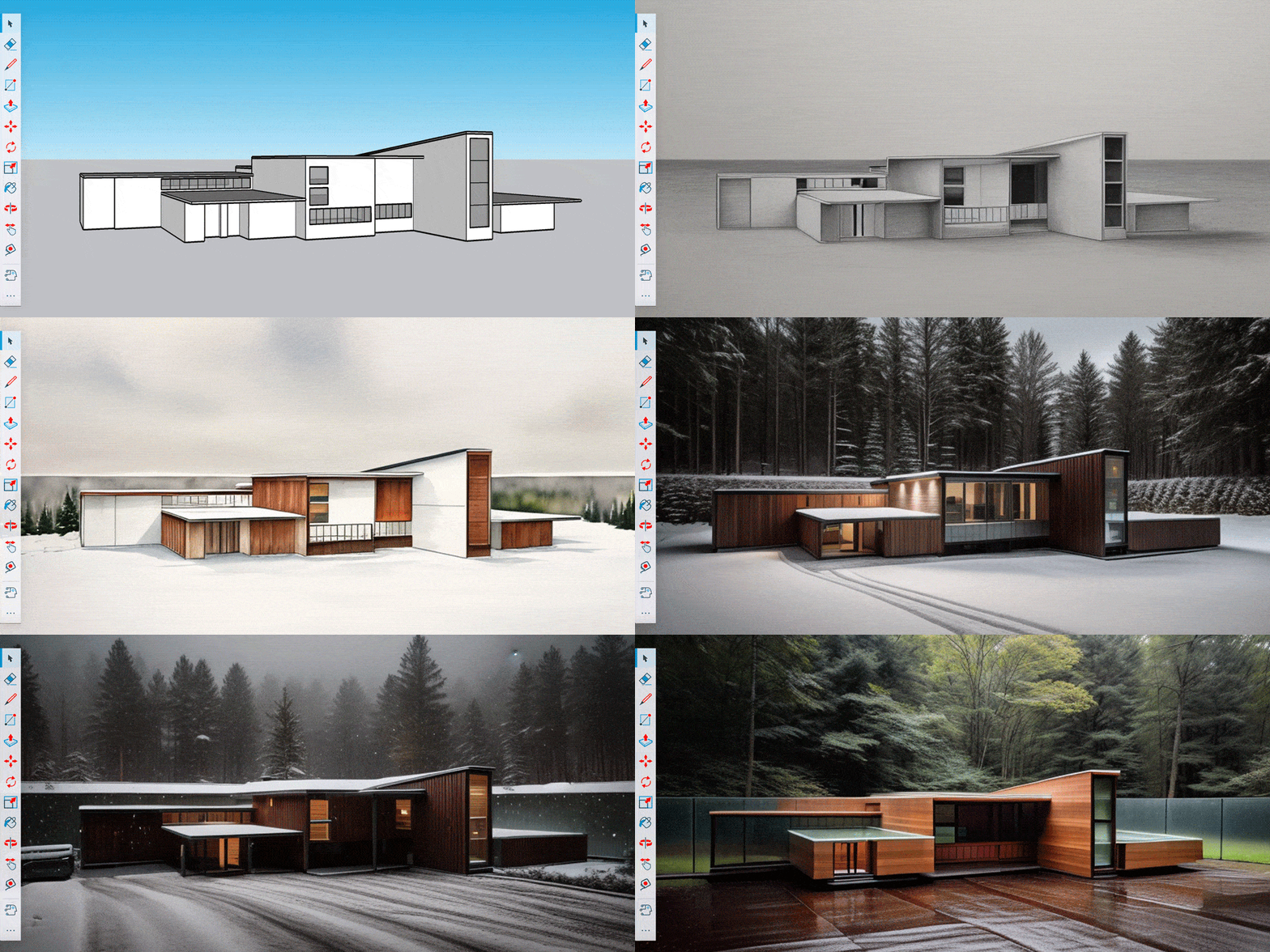
Rapidly generate conceptual renderings from even a basic 3D model using SketchUp Diffusion.
In your day-to-day, there’s likely a need to quickly and clearly communicate your ideas. With seemingly infinite design possibilities, we face a balancing act between time spent designing and time spent creating representative images that showcase your best, most creative solutions.
Luckily, AI can help. Here's how.
SketchUp + AI
AI has the power to extend your creative capacity and unlock new potential. We’re committed to driving innovation and making AI accessible where we spot its potential to transform work for the better.
While AI doesn’t have a creative vision of its own, it can help you focus yours. Diffusion, just released in #SketchUpLabs, brings easy-to-use generative AI into SketchUp, offering a novel way to quickly generate images that inspire your creative process and support your design narrative.
Bring your vision into focus
Choose from eight preset styles to define the aesthetic of your generated images.
If you can describe it, you can now see it in SketchUp. With a text prompt and a simple model, you can generate photorealistic or stylized images to demonstrate your distinct idea.
Instead of searching for something similar to what you envision and trying to convey to clients how your concept is “close but a little different,” you can now more precisely capture your unique creation.


Move quickly from concept sketch to rendered design options. Use the navigation arrows to view design concepts created with SketchUp Diffusion.
Quick tip: Get a head start on your preferred aesthetic by selecting one of Diffusion’s preset styles.
Overcome creative blocks
Settings sliders let you fine-tune your image output. Maintain your model geometry or put more power into your text prompt.
If you’re feeling a little stuck or are interested in exploring more possibilities, find inspiration by typing a description of the image you’d like to see. Sit back and let AI put new concepts in front of you.
Settings sliders let you decide how much influence your prompts have and how strictly your model is adhered to in generated images.
For example, say you have a basic massing model and want to generate some concepts for the form and finish of the project. Describe how you want the building to look with a text prompt, then try playing with the settings sliders. Dialing up “prompt influence” and dialing back “respect model geometry” will closely follow your text description but transform your model in the generated images so you can see new elements that might just inspire an entirely new direction.
The settings work in the other direction too. If you’re further along with your model and want to explore things like context, lighting and materiality, turn up “respect model geometry” to produce images that show your exact model with the finishes and context that you dictate.
Quick tip: If it’s still early days, you can jump straight to the text prompt to see your ideas manifest before you even model a thing.
Find alignment early
Add your generated image as an overlay in your SketchUp model using Add Scene.
Test options quickly and make better decisions with 3D modeling, idea generation, rapid visualization, and tools for collaboration — all in SketchUp.
When you’re ready to share your shortlist of exploratory images with stakeholders, use “Add Scene” to save your images as an overlay in the SketchUp viewport. Easy-to-navigate Scenes will help you transport clients and collaborators straight to the heart of your design. Identify ideal solutions and move projects forward faster.
Maintain creative control
Combine Markup mode on iPad with Diffusion to move from sketch to photorealistic concept rendering in seconds.
We see AI as an ideation partner and production assistant, but the vision is still your domain. Ultimately, you control the input with any combination of your model, markups on iPad, and text prompts. You determine the output by selecting the most appropriate Styles and Settings. Lastly, you choose how to share or use the results.
Refine the prompt to further develop an idea, save the image as a Scene to model or sketch over it, or share the images to kickstart collaboration. Diffusion lives at the intersection of creative freedom and expanded productivity.
Dial up your creative potential
Get started with Diffusion to extend your capabilities and boost your creative capacity while saving yourself time. Prepare to be inspired and delight your clients with how fast you can achieve clarity and alignment.
Ready to try Diffusion? If you’re looking for Diffusion on Desktop, find it in the Extension Warehouse. You can access it as a native tool in the latest versions of SketchUp for iPad and Web.
Diffusion is being released as part of the SketchUp Labs program. It’s available to active Go, Pro, or Studio subscribers free for a limited time* and with a free trial.
Tell us what you think
Have impressive, unexpected, or delightful results? We’d love to see how you use Diffusion and what you can come up with. Share feedback with us, the SketchUp Community or on social with #SketchUpLabs.
*Generative AI requires substantial processing resources. While accessing Diffusion in Labs, subscribers won't be subject to additional costs. We will announce future pricing changes at least 30 before they go into effect.


